


Winbeatz Login and Registration
Winbeatz login and registration give you one account for Casino and Sports in one place. You can create a profile with email or Google, then return anytime with the same details on desktop and mobile.
We keep account access simple and secure. You choose your sign-up method, confirm the required age and policy boxes, then manage your profile from the same interface. Win Beatz also shows bonus offers in a clear way, so you can see the headline value before you join.

Winbeatz Account Registration
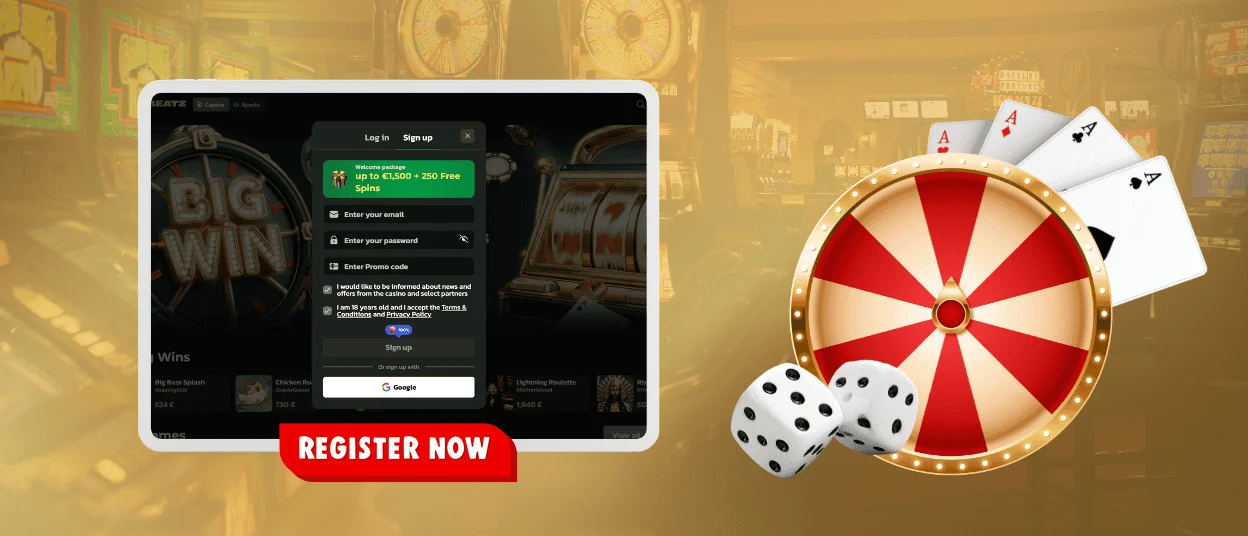
Create your Winbeatz account from the top-right corner of the website. Select Sign up to open the registration window. Enter your email and create a password. The form also includes a field for a promo code, so you can apply it during sign-up when you use one.
Before you finish, confirm that you are 18+ and accept the Terms & Conditions plus the Privacy Policy. You can also choose whether you want news and offer updates. After you submit the form, Winbeatz opens your new profile and connects it to the main lobby, so you can switch between Casino and Sports without a second registration.
Win Beatz also supports a faster option through Google sign-in. This connects your account to the same lobby and the same settings, with no extra steps.
What you unlock after sign-up
After registration, Winbeatz unlocks your personal account area. You can track your activity, manage profile details, and follow promotions in one place. Your account also helps you keep control, because you can adjust security and responsible gaming settings at any time.
The table below shows what you get right after you sign up.
| Account access | What it means on Winbeatz |
| Personal profile | Update basic details and manage your account preferences from one dashboard. |
| Bonuses overview | See available offers, including the welcome package, and check bonus status in one place. |
| Activities area | Track missions, tournaments, and other events linked to your account progress. |
| History and records | Review key account actions, including session activity and changes in your profile. |
| Responsible Gaming tools | Set limits and take breaks directly from your account settings. |
How to register at Winbeatz
Create a Winbeatz account in a few minutes from the Sign up button in the header or from the registration window on mobile. We keep the form short, so you can start playing without extra steps.
Open Sign up and enter your email and a secure password. You can also add a promo code in the same form when you have one. After that, confirm you are 18+ and accept the Terms & Conditions plus the Privacy Policy. Then submit the form to finish registration.
During sign-up, you will usually complete these fields and confirmations:
- Email and Password to create your login details
- Promo code (optional) to link a specific offer to your new account
- 18+ confirmation and acceptance of our rules before you create the profile
Winbeatz also supports Google sign-up from the same window. This option links your account to your Google login and helps you return faster on new devices.
Winbeatz Login and Account Management
To log in, select Log in in the top-right corner. Enter the email linked to your Winbeatz account and type your password, then confirm. You can also use Google login from the same window when you prefer a quick sign-in flow.
After login, Winbeatz keeps your key tools close. Your account area helps you check what matters without searching through the lobby. You can review basic profile settings, see your recent activity, and manage safety options that protect your access. Use the same Win Beatz login on desktop and mobile. Winbeatz keeps one account, so your profile stays the same on every device.
Forgot password on Winbeatz
Reset your Winbeatz password from the Log in window and return to your account quickly. You only need access to the email you used at registration.
Open Log in and click Forgot password? Enter your email and send the request. Winbeatz will email you a reset link. Open the message, create a new password, then sign in again.
If the email does not arrive, wait a few minutes and check Spam or Promotions. Make sure you typed the same email that is linked to your account. If you cannot open that inbox anymore, contact support and request account recovery.
Verification (KYC) at Winbeatz
Winbeatz uses verification (KYC) to confirm account ownership and protect withdrawals. We often ask for it before the first withdrawal. We can also request it earlier when the system detects unusual login attempts or irregular payment activity.
You complete KYC inside your account by uploading clear photos or scans. We usually ask for a government-issued ID, such as a passport, national ID card, or driver’s licence. We can also request proof of address, such as a utility bill or bank statement. In some cases, we ask for payment method confirmation or a selfie with your ID, so we can match the account to the real owner.
Use good light, show the full document, and keep all text readable. Match your profile details to the document details, because small differences can delay approval.
Frequently Asked Questions (FAQ)
Can I use the same Winbeatz account on desktop and mobile?
Yes. Winbeatz uses one account across devices. Log in with the same email and password, and the platform keeps your profile, settings, and account status synced.
This also helps when you switch between Casino and Sports, because you keep everything under one login.
I do not receive the email from Winbeatz. What should I check first?
Start with your inbox folders. Check spam, promotions, and any filtered tabs. Then confirm that you typed your email correctly during registration or password recovery.
Email providers can delay messages during peak traffic. When the message still does not arrive, contact support and share the email you used plus the action you tried, such as registration confirmation or password reset.
Can I change my email address after I register?
Yes, but Winbeatz protects this action with security checks. We may ask you to confirm the change so we can stop unauthorised edits.
Open your profile settings and check the email section. If the field is locked, contact support. We will explain the steps and may request a short confirmation before we update the email.
Why does my login fail even when my password looks correct?
Login errors often come from small mismatches. Double-check spacing and keyboard language, and make sure the email matches the one linked to your account. Win Beatz may also block repeated wrong attempts for a short time to protect the profile.
A password reset solves most access issues quickly. When the error continues after a reset, contact support and include the exact message shown on screen.
What should I do when I play on a shared device?
Log out as soon as you finish. This prevents other people from opening your account.
Use a private browser window when possible. It helps because the browser does not save your login and reduces auto-fill problems.


